Table of Contents
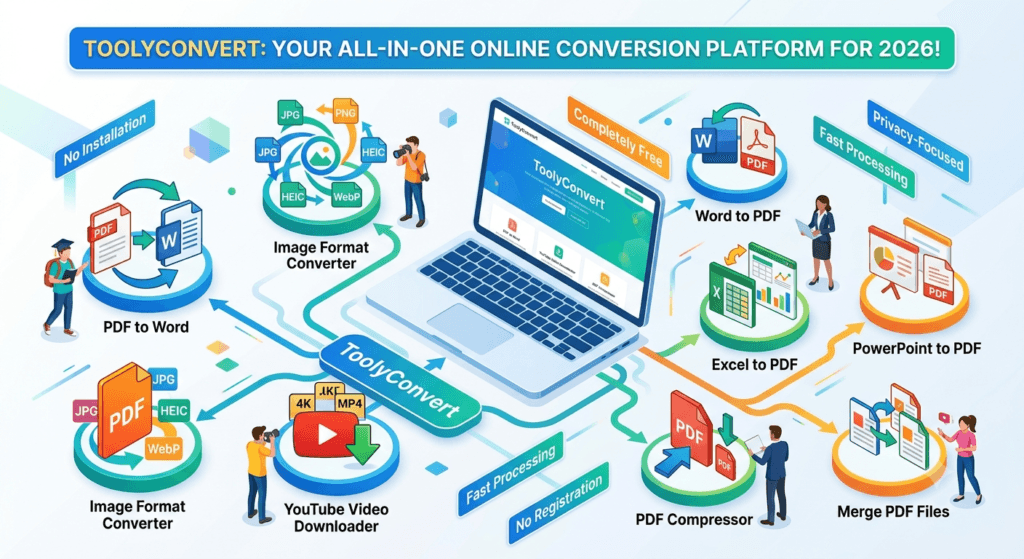
In today’s digital world, having a reliable online conversion tool can save you hours of frustration. ToolyConvert has emerged as a comprehensive platform offering everything you need for file conversions, downloads, and transformations—all in one place.
Let’s explore the top 10 features that make ToolyConvert essential in 2026.
Why Choose ToolyConvert?
Before diving into specific features, here’s why ToolyConvert stands out:
- No Installation Required: Access all tools directly from your browser.
- Completely Free: No hidden charges or premium tiers.
- Privacy-Focused: Your files are automatically deleted after conversion.
- Fast Processing: Quick conversions without long waiting times.
- No Registration: Start converting immediately without creating an account.
1. PDF to Word Converter
Tool: https://www.toolyconvert.com/pdf-to-word
Best For: Editing PDF documents
Need to edit a PDF document? The PDF to Word converter on ToolyConvert makes it effortless.
How It Works
- Upload your PDF file.
- Click Convert.
- Download your editable Word document.
Key Benefits
- Preserves formatting
- Maintains images and tables
- No quality loss
- Handles multi-page documents
Perfect for:
- Editing contracts and agreements
- Modifying resumes
- Converting ebooks for editing
2. Image Format Converter
Tool Category: https://www.toolyconvert.com/tools/image
Best For: Converting between JPG, PNG, HEIC, WebP and more
The online image converter supports all major image formats with just a few clicks.
Supported Formats
- JPG/JPEG
- PNG
- HEIC
- WebP
- GIF
- BMP
- TIFF
Use Cases
- Convert iPhone HEIC photos to JPG
- Change PNG to JPG for smaller file sizes
- Convert images for web optimization
- Batch convert multiple images
3. YouTube Thumbnail Downloader
Tool: https://www.toolyconvert.com/youtube-thumbnail
Best For: Downloading YouTube thumbnails in high quality
Download high-resolution thumbnails from any YouTube video instantly.
Features
- HD thumbnail download
- Quick processing
- No registration required
- Works with public YouTube videos
Popular Uses
- Creating blog posts
- YouTube research
- Graphic design inspiration
- Thumbnail collections
4. PDF Compressor
Tool: https://www.toolyconvert.com/compress
Best For: Reducing PDF file sizes
Need to email a large PDF? The PDF compression tool reduces file size without significant quality loss.
Compression Options
- Low compression (best quality)
- Medium compression (balanced)
- High compression (smallest size)
Benefits
- Faster email attachments
- Save storage space
- Quicker uploads
- Maintain readability
5. Word to PDF Converter
Tool: https://www.toolyconvert.com/word-to-pdf
Best For: Creating professional, non-editable documents
Convert Word documents to PDF format for universal compatibility.
Why Convert to PDF
- Preserve formatting across all devices
- Prevent unauthorized editing
- Professional presentation
- Smaller file sizes
Ideal For:
- Job applications
- Official documents
- Presentations
- Reports and proposals
6. Excel to PDF Converter
Tool: https://www.toolyconvert.com/excel-to-pdf
Best For: Sharing spreadsheets professionally
Transform Excel spreadsheets into PDF format while maintaining formatting, charts, and data integrity.
Features
- Preserves all worksheets
- Maintains charts and graphs
- Keeps cell formatting
- Page orientation options
Common Applications
- Financial reports
- Data presentations
- Budget spreadsheets
- Inventory lists
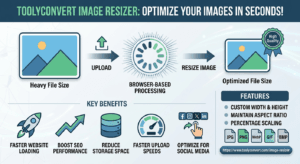
7. Image Resizer
Tool: https://www.toolyconvert.com/image-resizer
Best For: Optimizing images for websites and social media
Resize images to custom dimensions or preset sizes without losing quality.
Options Available
- Custom width and height
- Percentage scaling
- Preset social media sizes
- Maintain aspect ratio
Perfect For
- Social media posts
- Website optimization
- Email signatures
- Profile pictures
8. PowerPoint to PDF
Tool: https://www.toolyconvert.com/ppt-to-pdf
Best For: Sharing presentations universally
Convert PowerPoint presentations to PDF to ensure they display correctly on every device.
Advantages
- No Microsoft Office required to view
- Prevents accidental editing
- Smaller file sizes
- Universal compatibility
Use Cases
- Client presentations
- Educational materials
- Training documents
- Portfolio sharing
9. PNG to JPG Converter
Tool: https://www.toolyconvert.com/png-to-jpg
Best For: Reducing image file sizes
PNG files are high quality but larger in size. Convert them to JPG for faster loading and easier sharing.
Why Convert PNG to JPG
- Smaller file sizes
- Faster website loading
- Better for email attachments
- Maintains excellent visual quality
When to Use
- Website images
- Social media uploads
- Email attachments
- Photo sharing
10. Merge PDF Files
Tool: https://www.toolyconvert.com/merge
Best For: Combining multiple PDFs into one
Merge several PDF documents into a single organized file.
Features
- Drag-and-drop ordering
- Unlimited file merging
- Maintains original quality
- Fast processing
Practical Uses
- Combine scanned documents
- Merge invoices
- Create complete reports
- Organize receipts
How to Use ToolyConvert
Step 1
Visit https://www.toolyconvert.com
Step 2
Select the tool you need.
Step 3
Upload your file.
Step 4
Choose conversion settings (if available).
Step 5
Click Convert.
Step 6
Download your converted file.
Step 7
Your uploaded file is automatically deleted after conversion for privacy.
Advanced Tips for Better Conversions
Optimize Before Converting
- Rename files clearly before uploading.
- Remove unnecessary PDF pages.
- Compress oversized images.
- Check that your file format is supported.
Speed Up Your Workflow
- Bookmark your most-used tools.
- Organize files before uploading.
- Use batch conversion when available.
- Close unnecessary browser tabs.
Privacy Best Practices
- Avoid uploading highly sensitive documents.
- Clear your browser cache if desired.
- Always use the secure HTTPS version of ToolyConvert.
- Files are automatically deleted after conversion.
ToolyConvert vs Desktop Software
| Feature | ToolyConvert | Desktop Software |
|---|---|---|
| Cost | Free | $50–$300 |
| Installation | None | Required |
| Updates | Automatic | Manual |
| Device Support | Any Browser | OS Specific |
| Storage | No Disk Space | Uses Local Storage |
| Accessibility | Anywhere | Installed Device |
Common Conversion Scenarios
Student Preparing an Assignment
Need: Convert Word to PDF
Tool: https://www.toolyconvert.com/word-to-pdf
Benefit: Professional formatting without compatibility issues.
Business Professional
Need: Compress a large proposal.
Tool: https://www.toolyconvert.com/compress
Benefit: Easier email sharing and faster uploads.
Designer or Photographer
Need: Resize images.
Tool: https://www.toolyconvert.com/image-resizer
Benefit: Optimized images for websites and social media.
Office User
Need: Merge multiple PDF files.
Tool: https://www.toolyconvert.com/merge
Benefit: Keep documents organized in one file.
Frequently Asked Questions
Is ToolyConvert free?
Yes. All tools are completely free to use.
Do I need an account?
No. You can start converting immediately without registration.
Are my files safe?
Yes. Files are automatically deleted after processing.
Can I convert multiple files?
Many ToolyConvert tools support batch conversion.
Which browsers are supported?
Chrome, Firefox, Edge, Safari, and other modern browsers.
Can I use ToolyConvert offline?
No. Since it’s a web-based platform, an internet connection is required.
Conclusion
ToolyConvert is a one-stop platform for file conversion, PDF management, and image utilities in 2026. Whether you need to convert documents, compress PDFs, resize images, download YouTube thumbnails, or merge files, ToolyConvert provides free, fast, and privacy-focused tools directly from your browser.
Start using ToolyConvert today by visiting:
https://www.toolyconvert.com