

Table of Contents
Here’s Exactly Why (And How I Fixed It)
Quick Summary: Next.js Server Components can actually make your app slower if you use them wrong. This is a real mistake I made on a production dashboard. Here’s what went wrong, what I measured, and exactly how I fixed it.
I’m going to say something that might raise a few eyebrows in the Next.js community:
The “use Server Components everywhere” advice is hurting people’s apps.
Not because Server Components are bad. They’re genuinely great when used correctly. But the way they’ve been taught — “default to server, avoid client” — has created a wave of Next.js apps that look fast on paper and feel slow in real life.
I know because I built one.
My Embarrassing Production Mistake
In March 2026 I was hired to migrate a SaaS analytics dashboard from the Next.js Pages Router to the App Router. About 40 routes, real paying users, genuinely complex UI with filters, search, data tables, and charts.
I was excited. I’d read the Next.js App Router docs cover to cover. I watched every talk from the React team. I understood Server Components conceptually.
So I went aggressive. Deleted ‘use client’ directives everywhere I could find them. Pushed data fetching to the server. Felt very smart about it.
We shipped. Bundle size dropped. Lighthouse scores looked great.
Then the support tickets started.
“Filters feel broken.” · “Search is laggy.” · “The page seems to reload every time I click something.”
One user said it felt like the app was “loading twice.”
He wasn’t wrong. And the fix, once I found it, was almost embarrassingly simple.
Why Next.js Server Components Can Slow Down Your App
The Hidden Network Round Trip
When you make interactive UI server-driven in Next.js, every user interaction becomes a network request:
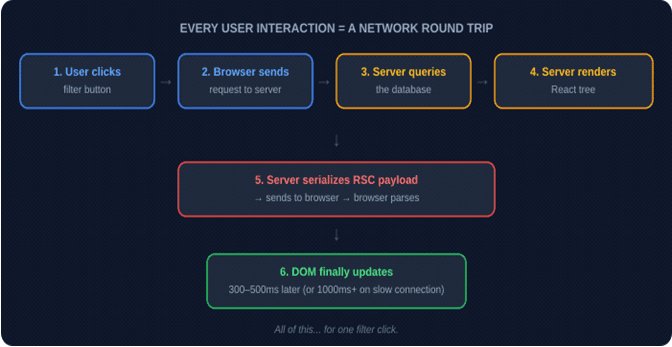
That whole chain takes time. On a good connection maybe 300–500ms. On a slow connection or overloaded server? Easily over a second. For a filter button. One click.
This is why your app feels slow even when your Lighthouse score is perfect. Lighthouse measures initial load. It doesn’t measure what happens when your users actually use your app.
Key insight: Lighthouse scores measure page load. They don’t measure interactivity performance. An app can score 100 on Lighthouse and still feel terrible to use.
The Serialization Problem
Here’s the part that really got me.
When data moves from a Server Component to a Client Component, React has to serialize it — convert it to a special JSON-like format, send it over the network, and parse it again on the client. This is called the RSC payload. And it can get very large very fast.
Here’s the mistake I was making:
// ❌ Dashboard.tsx (Server Component) — WRONG APPROACH

export default async function Dashboard() {

  // Fetching thousands of rows from database

  const analyticsData = await db.query('SELECT * FROM analytics');

  // Passing ALL of it to a client component

  return <InteractiveChart data={analyticsData} />;

}

// InteractiveChart.tsx

'use client'

export function InteractiveChart({ data }) {

  // Processing it again on the client — totally unnecessary

  const chartData = useMemo(() => processData(data), [data]);

  return (/* render chart */);

}
What I was actually doing:
- Fetch 10,000 rows on the server (fine)
- Serialize all 10,000 rows into RSC payload (bad)
- Send 2MB payload over the network (very bad)
- Parse it again on the client (pointless)
- Process it into chart data on the client (should have done this on server)
I had created an incredibly complicated way to download a massive file. And I called it “zero bundle size.”
How to check if this is happening to you: Open Chrome DevTools → Network tab → Filter by Fetch/XHR → Click something interactive in your app → Look for requests with ?_rsc= in the URL → Check the response size.
If you see anything over 100kb for a simple user interaction, you’re paying what developers call the serialization tax — a real performance cost that doesn’t show up in your bundle analyzer.
Three Fixes That Actually Worked
I’m not going to dress these up with clever names. Here’s what I changed and why it worked.
Fix 1: Stop Making Data Block Your UI
My filter bar — just some dropdowns and input fields — had zero data dependencies. It didn’t need anything from the database to render. But it lived inside a component tree that waited for a slow database query. So users stared at a blank screen for an extra second before they could even touch the filters.
The fix was Suspense:
// ✅ layout.tsx — CORRECT APPROACH
import { Suspense } from 'react';
import { FilterBar } from './FilterBar'; // 'use client' — renders instantly
import { DataTable } from './DataTable'; // Server Component — streams in

export default function Layout() {
  return (
    <main>
      {/* No data needed — renders in milliseconds */}
      <FilterBar />

      {/* Streams in when database query finishes */}
      <Suspense fallback={<TableSkeleton />}>
        <DataTable />
      </Suspense>
    </main>
  );
}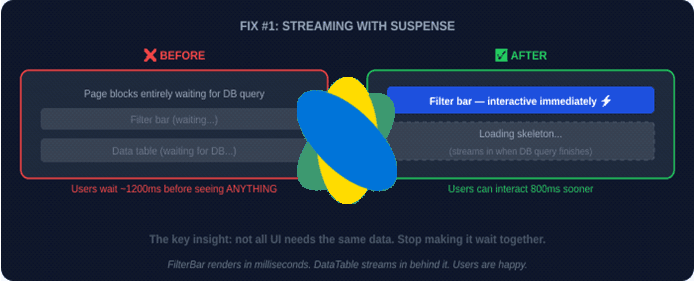
This pattern is called streaming in Next.js. The official docs have a good explanation here: Next.js Loading UI and Streaming
Result: Users could interact with the UI about 800ms sooner than before.
Fix 2: Stop Running Interactive Features Through the Server
My search bar was triggering a server re-render on every single keystroke.
Think about that. Every letter the user typed was: sending a network request, hitting the database, re-rendering a React tree on the server, sending an RSC payload back, parsing it on the client.
Search is inherently interactive. It belongs on the client. Full stop.
I switched to SWR — a data fetching library built by the Vercel team (same people who build Next.js):
// ✅ SearchPanel.tsx — CLIENT SIDE SEARCH
'use client'
import useSWR from 'swr';
import { useState } from 'react';

const fetcher = (url: string) => fetch(url).then(r => r.json());

export function SearchPanel() {
  const [query, setQuery] = useState('');
  const { data, isLoading } = useSWR(
    query ? `/api/search?q=${query}` : null,
    fetcher,
    {
      keepPreviousData: true,  // no flickering between searches
      dedupingInterval: 300,   // debounce built in
    }
  );
  // ... return JSX
}
Instant response. Client-side caching. No server round trip for every keystroke.
SWR handles caching, revalidation, and deduplication automatically. SWR docs here if you haven’t used it.
If you need more features like optimistic updates or complex cache invalidation, TanStack Query is excellent too. Here’s a comparison between the two.
Result: Search felt instant. Server load dropped noticeably.
Fix 3: Process Data on the Server, Send Only What the Client Needs
This one is the most important fix and the simplest concept.
Your server has CPU. Use it.
Instead of sending raw data to the client and processing it there, do the processing on the server and send only the result:
export default async function Dashboard() {
  const rawData = await db.query('SELECT * FROM analytics');

  // Client has to process 10,000 rows 🐌
  return <InteractiveChart data={rawData} />;
}

// ✅ RIGHT — process first, send minimum
export default async function Dashboard() {
  const rawData = await db.query('SELECT * FROM analytics');

  // Server processes 10,000 rows into 50 chart points ⚡
  const chartData = aggregateForChart(rawData);

  // Client receives 50 points, renders immediately
  return <InteractiveChart data={chartData} />;
}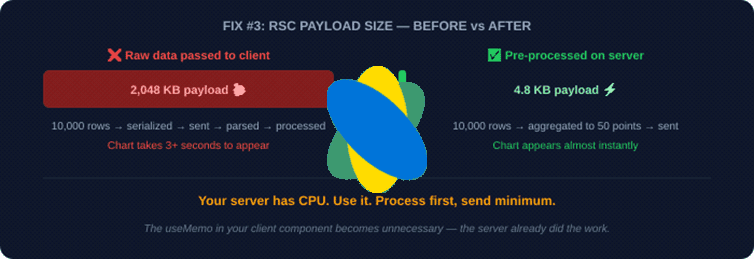
My RSC payload went from 2MB to under 5kb. The useMemo in the client component became unnecessary — the server already did the work. The client just renders.
Result: Chart loaded 3x faster. No more client-side processing lag.
Where Does React 19 Fit Into This?
React 19 ships with the React Compiler (previously called React Forget). This is a big deal.
The compiler automatically handles memoization for Client Components. You no longer need to manually write useMemo and useCallback everywhere to prevent unnecessary re-renders. React Compiler official docs
One reason developers pushed everything to Server Components was to avoid re-render performance problems on the client. Client Components re-render. Server Components don’t. So “put it on the server” felt safer.
With the React Compiler, that reason weakens significantly. Your Client Components will only re-render when their specific props or state actually change — automatically, without you writing a single useMemo.
My honest opinion: The “server-everything” wave was partly a response to client-side React being hard to optimize manually. The compiler changes that. I think in 12–18 months we’ll look back at 2024’s “avoid use client at all costs” advice the same way we look back at “always use Redux for everything” — well-intentioned, overcorrected, and eventually balanced out.
Is Your App Affected? Run This Audit
Open your browser DevTools right now and do this:
Step 1: Go to Network tab → Filter by Fetch/XHR
Step 2: Interact with your app — click a filter, type in search, sort a table
Step 3: Look for requests with _rsc in the URL
Step 4: Check the response payload size
Then ask yourself:
- RSC payload over 100kb? You’re over-serializing. Apply Fix 3.
- TTFB spikes on filter/sort clicks? Your interactive UI is server-driven. Apply Fix 2.
- Passing Date objects, Maps, or Sets across boundary? These serialize badly or break. Convert to plain objects first.
- Using useEffect to sync server data to client state? You’re fighting the framework. Rethink the data flow.
- Search triggers full server re-render? Apply Fix 2 immediately.
- UI blocks on data loading? Apply Fix 1 with Suspense.
If you checked even one of these, your users are feeling it even if your metrics don’t show it.
The Mental Model That Fixed Everything For Me
❌ Stop thinking: “Server Components = good, Client Components = bad”
✅ Start thinking: “Where does this data live and who needs to react to it?”
Use Server Components when:
- Rendering content for the first time
- Fetching data that doesn’t change based on user input
- Keeping API keys and database connections off the client
- SEO-critical content that needs to be in the HTML
Use Client Components when:
- User clicks, types, drags, or interacts with anything
- Data updates based on what the user does
- You need browser APIs (localStorage, window, etc.)
- Real-time or frequently refreshing data
The boundary between them is essentially a network call. Every time you put interactive UI on the server side of that boundary, you’re adding latency to user interactions. Sometimes that’s acceptable. Usually it isn’t.
Frequently Asked Questions
Should I use ‘use server’ inside a Client Component?
Yes — but only for Server Actions. If you need to submit a form or mutate data, Server Actions let you make a lightweight call to the server without moving the whole component there. This is completely different from making a component a Server Component. Next.js Server Actions docs
Does the React Compiler optimize Server Components?
No. Server Components don’t run on the client and never re-render, so memoization doesn’t apply to them. The React Compiler only optimizes Client Components.
SWR or TanStack Query — which should I use?
If you’re already in the Next.js/Vercel ecosystem, SWR is simpler and integrates naturally. If you need advanced features like offline support, complex cache invalidation, or optimistic UI, TanStack Query is worth the extra setup. Both are production-ready. Full comparison here
My Lighthouse score is 100 but the app feels slow. What gives?
Lighthouse measures initial page load performance. It doesn’t measure interaction latency, RSC payload sizes, or how fast your UI responds to user input. For real interactivity performance, look at Interaction to Next Paint (INP) — Google’s newer metric that actually measures responsiveness.
How do I know if my RSC payload is too large?
Chrome DevTools → Network → Fetch/XHR → interact with your app → find _rsc requests → check response size.
Under 50kb = fine
50–100kb = worth investigating
Over 100kb = you have a problem
Further Reading
These are genuinely worth your time:
- Next.js Rendering Fundamentals — official docs, start here
- React Server Components RFC — the original proposal from the React team
- Vercel Blog: Understanding React Server Components — practical breakdown
- Patterns.dev: React Server Components — great visual diagrams
- Web.dev: Interaction to Next Paint — the metric that actually measures what your users feel
- SWR Documentation — if you’re not using this, you should be
- React Compiler Docs — understand what’s coming
Wrapping Up
Server Components are a genuinely good idea used in the wrong places by a lot of well-meaning developers — including me.
The fix isn’t to abandon them. It’s to be honest about what they’re good at and stop forcing them into roles they weren’t designed for.
Compute heavy data on the server. Stream the UI in pieces. Let the client own interactivity. Measure your RSC payloads. Trust your users when they say something feels slow even when your metrics look fine.
That’s it. No framework. No clever architecture name. Just thinking clearly about where work should happen.
Most Popular Article
https://www.hemantinsights.com/why-i-stopped-using-useeffect-for-data-fetching/