

Table of Contents
Pillar 1 — The Problem: What You Were Taught (And Why It’s Outdated)
Let me guess. At some point, a tutorial taught you this pattern:
❌ components/UserProfile.jsx — The Old Way
// The classic pattern — still everywhere in 2026
import { useState, useEffect } from 'react';

function UserProfile({ userId }) {
  const [user, setUser] = useState(null);
  const [loading, setLoading] = useState(true);
  const [error, setError] = useState(null);

  useEffect(() => {
    setLoading(true);
    fetch(`/api/users/${userId}`)
      .then(res => res.json())
      .then(data => {
        setUser(data);
        setLoading(false);
      })
      .catch(err => {
        setError(err);
        setLoading(false);
      });
  }, [userId]);

  if (loading) return <p>Loading...</p>;
  if (error) return <p>Error!</p>;
  return <h1>{user.name}</h1>;
}
This works. But in 2026, especially inside Next.js App Router, it has real problems — some obvious, some subtle. Let’s break them down.
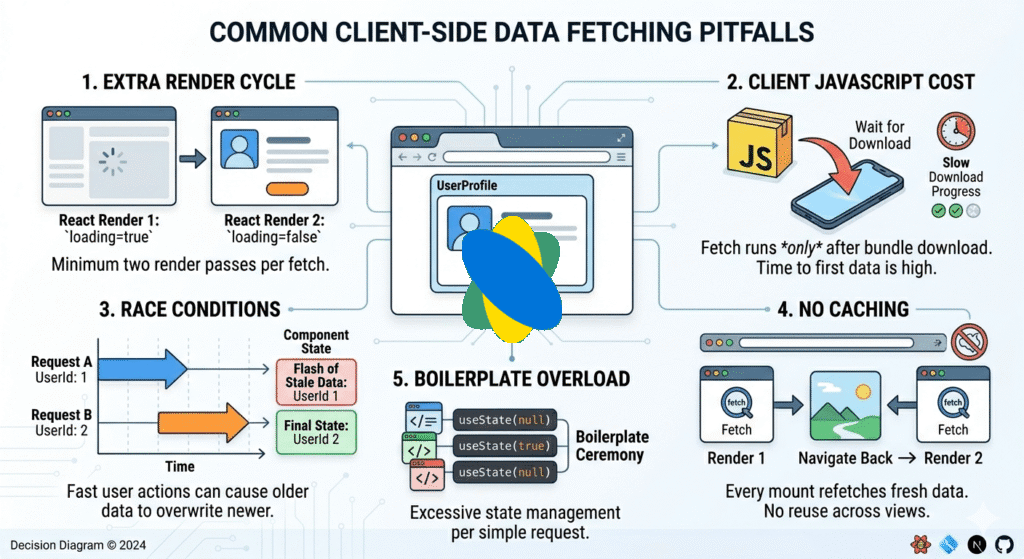
What’s actually wrong here?
- Extra render cycle: React renders the component once with loading=true, then again after the fetch. That’s two renders minimum.
- Client JavaScript cost: The fetch runs in the browser. The user downloads your component JS bundle before they see any data.
- Race conditions: If userId changes quickly, older requests can resolve after newer ones, causing stale data to flash.
- No caching: Every time this component mounts, it fetches fresh. Navigate away and back? Fetches again.
- Boilerplate overload: Three state variables (user, loading, error) just to show a name. Every fetch needs this ceremony.
Pillar 2 — Pattern 1: Async Server Components (The Default Choice)
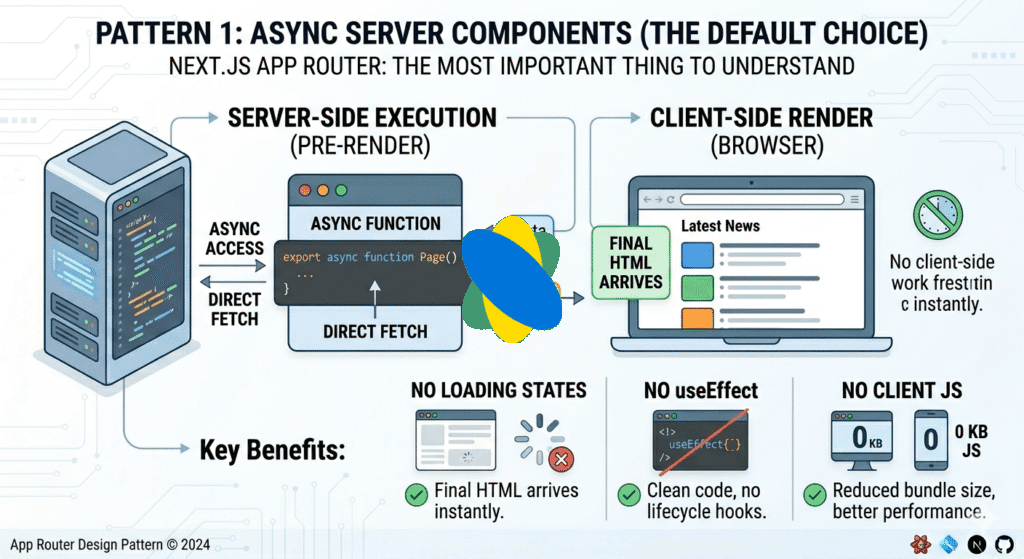
This is the most important thing to understand about Next.js App Router: your components can be async. And in App Router, every component is a Server Component by default.
That means you can fetch data directly inside the component, on the server, before any HTML reaches the browser. No loading states. No useEffect. No client JS at all.
✅ app/users/[userId]/page.tsx — Server Component Pattern
// ✅ The App Router way — async Server Component
// app/users/[userId]/page.tsx

async function UserProfile({ params }: { params: { userId: string } }) {
  // This runs on the server. No useEffect needed.
  const user = await fetch(`https://api.example.com/users/${params.userId}`, {
    next: { revalidate: 3600 } // Cache for 1 hour
  }).then(res => res.json());

  // By the time the browser receives HTML, data is already here
  return <h1>{user.name}</h1>;
}

export default UserProfile;
That’s it. No useState. No useEffect. No loading variable. The component just… works. The browser never even knows a fetch happened.
What about error handling?
Create an error.tsx file in the same folder. Next.js will show it automatically if the async component throws.
// app/users/[userId]/error.tsx
'use client'; // Error components must be Client Components

export default function Error({
  error,
  reset,
}: {
  error: Error & { digest?: string };
  reset: () => void;
}) {
  return (
    <div>
      <h2>Something went wrong loading this user.</h2>
      <button onClick={() => reset()}>Try again</button>
    </div>
  );
}
Pillar 3 — Pattern 2: The use() Hook for Client Components
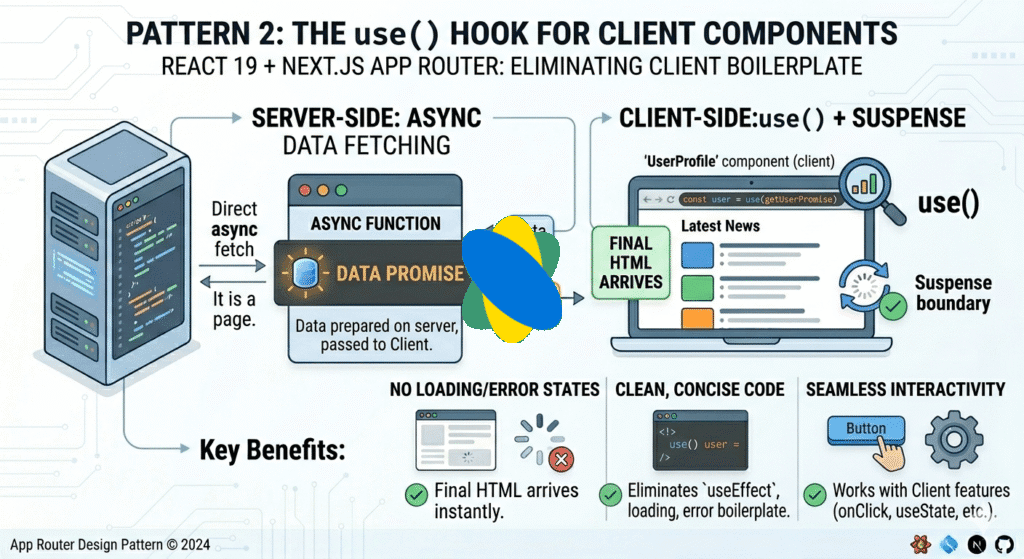
Sometimes you genuinely need a Client Component — maybe it uses onClick, useState, or browser APIs. In that case, React 19’s use() hook is the answer.
The use() hook can read a Promise. Combined with Suspense, it eliminates the loading/error state boilerplate entirely.
// The full pattern: Server Component passes a Promise to a Client Component

// 1. Server Component — creates the promise
// app/dashboard/page.tsx
import { Suspense } from 'react';
import { StatsWidget } from './StatsWidget';

export default function Dashboard() {
  // Create the promise on the server but DON'T await it
  const statsPromise = fetch('https://api.example.com/stats').then(r => r.json());

  return (
    <Suspense fallback={<p>Loading stats...</p>}>
      <StatsWidget promise={statsPromise} />
    </Suspense>
  );
}
// 2. Client Component — consumes the promise with use()
// app/dashboard/StatsWidget.tsx
'use client';
import { use } from 'react';

export function StatsWidget({ promise }: { promise: Promise<Stats> }) {
  // use() suspends rendering until the promise resolves
  // If it throws, the nearest error.tsx catches it
  const stats = use(promise);

  // No loading check needed — if we're here, data is ready
  return <div>{stats.totalUsers} users</div>;
}
⚠ The Caching Pitfall Nobody Warns You About
Never create the Promise inside the Client Component. If you do, a new Promise is created on every render, causing an infinite fetch loop. Always create the Promise in a Server Component and pass it down as a prop.
Pillar 4 — Pattern 3: Server Actions for Data Mutations
The old way to handle form submissions: useEffect listening to state, or a fetch() call inside an onClick handler. The new way: Server Actions.
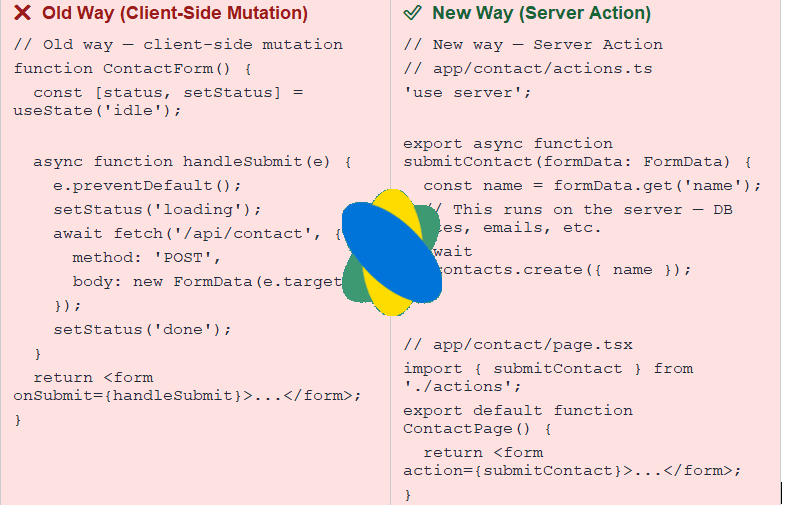
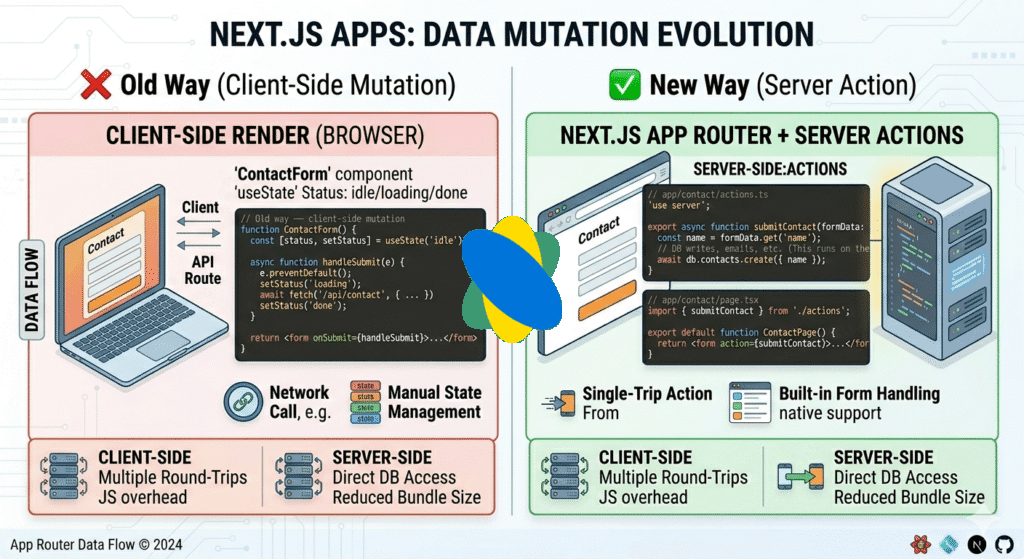
The Server Action version is shorter, runs securely on the server, and works even with JavaScript disabled in the browser. That last point matters for accessibility and Core Web Vitals.
Pillar 5 — Pattern 4: React Query for Complex Client Caching
Server Components handle most cases. But sometimes you need advanced client-side caching — infinite scroll, optimistic updates, polling, or cache invalidation across multiple components. This is where React Query v5 still shines.
// React Query v5 — still the best for complex client caching
// app/providers.tsx
'use client';
import { QueryClient, QueryClientProvider } from '@tanstack/react-query';
const queryClient = new QueryClient();

export function Providers({ children }: { children: React.ReactNode }) {
  return (
    <QueryClientProvider client={queryClient}>
      {children}
    </QueryClientProvider>
  );
}

// components/PostList.tsx
'use client';
import { useQuery } from '@tanstack/react-query';

function PostList() {
  const { data: posts, isLoading } = useQuery({
    queryKey: ['posts'],
    queryFn: () => fetch('/api/posts').then(r => r.json()),
    staleTime: 5 * 60 * 1000, // Consider data fresh for 5 minutes
  });

  if (isLoading) return <p>Loading...</p>;
  return posts.map(p => <div key={p.id}>{p.title}</div>);
}
Use React Query when you need: real-time refetching, cache invalidation after mutations, background refetching, or pagination/infinite scroll. For everything else, Server Components are the right choice.
Pillar 6 — The Decision Framework: Which Pattern to Use When
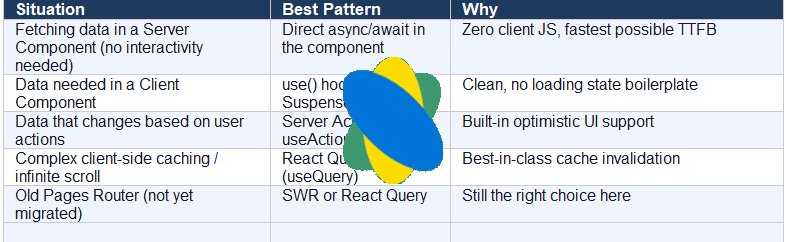
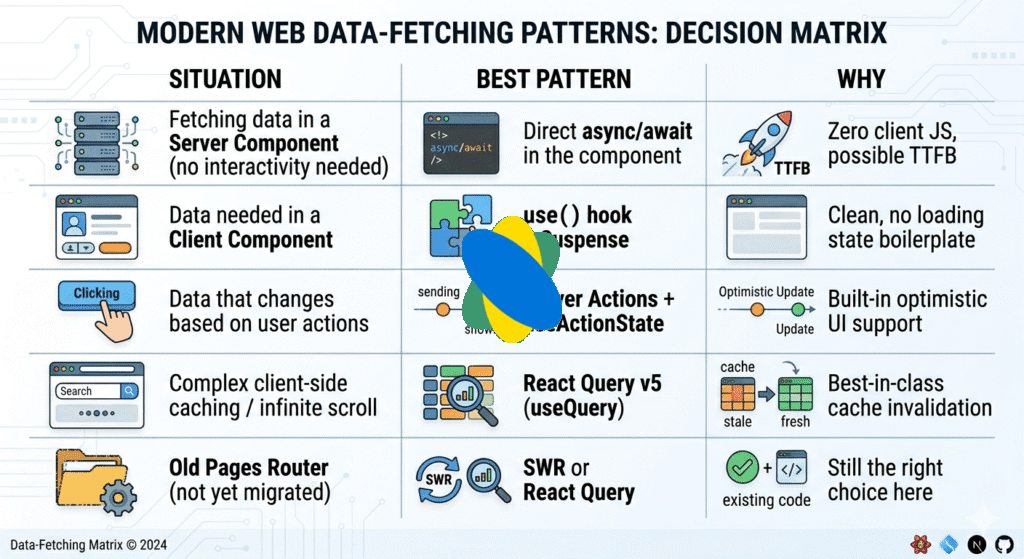
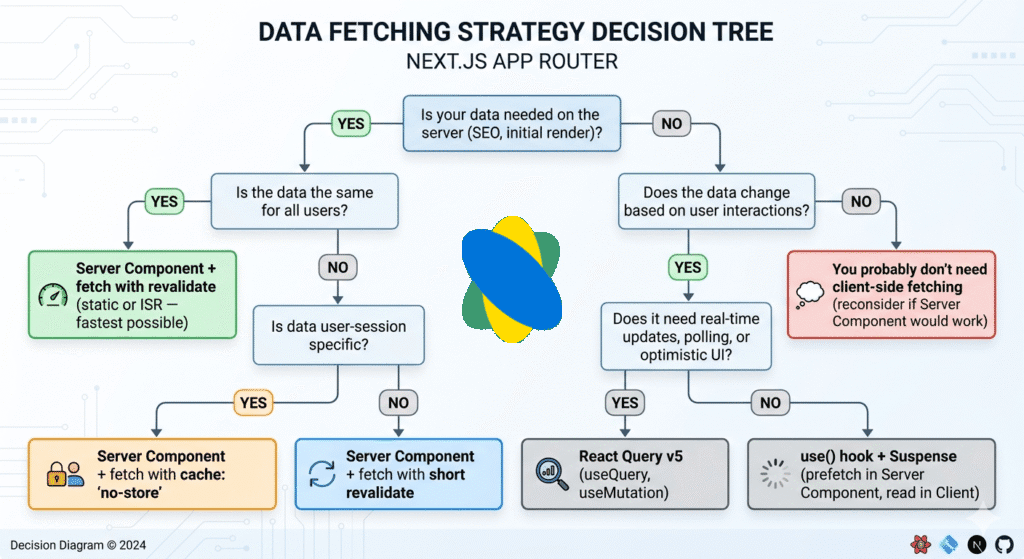
Here’s the quick-reference table. Screenshot this. Bookmark it. Share it with your team.
🧠 The mental model to remember
Ask: ‘Does the user need to interact with this data, or just see it?’ If they just see it → Server Component. If they interact with it → use() hook or React Query. If they change it → Server Action.
Bonus — 3 Common Mistakes When Migrating Away from useEffect
Mistake 1: Adding ‘use client’ too early
The most common mistake. Developers see that Server Components can’t use hooks, so they slap ‘use client’ on everything. This defeats the entire purpose.
Rule of thumb: push ‘use client’ as deep into the component tree as possible. Wrap only the interactive parts, not the entire page.
Mistake 2: Forgetting that fetch() is auto-deduplicated in Server Components
In App Router, if two Server Components on the same page call fetch() with the same URL and options, Next.js makes only ONE actual network request. You don’t need to hoist the fetch or share state. Just fetch where you need it.
Mistake 3: Using useEffect for one-time initialization
If you’re using useEffect with an empty dependency array just to run something once on mount, ask if it can be a Server Component instead. If the logic is truly client-only (reading localStorage, initializing an analytics SDK), use a custom hook — not raw useEffect in every component.
Summary: The Full Picture
Here’s what changed, and why it matters:
- useEffect is not wrong. It’s just the wrong tool for data fetching in App Router.
- Async Server Components handle 80% of data fetching use cases — faster, simpler, better for SEO.
- The use() hook is the clean way to handle async data in Client Components.
- Server Actions replace the mutation boilerplate you used to write with fetch() + onClick.
- React Query still has its place for complex client-side caching scenarios.
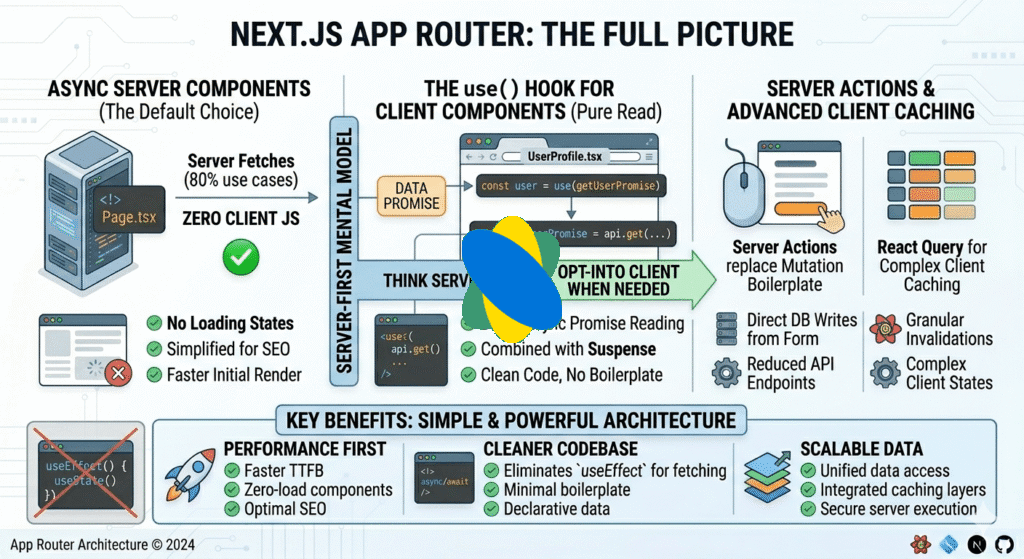
This change is not just about writing code differently. It changes how the whole system is built.The App Router wants you to build for the server first. You only use the client (the browser) when you absolutely need to.Once you understand this new way of thinking, everything becomes much easier.
What to do next
Pick one component in your existing codebase that uses useEffect for fetching. Try converting it to an async Server Component. If it works — great. If it can’t be a Server Component, try the use() hook pattern. That single refactor will make the whole thing click.
Most Popular Article
https://www.hemantinsights.com/nextjs-server-components-performance/
Frequently Asked Questions
Is useEffect actually bad? Should I stop using it completely?
No — useEffect is not bad. It is a powerful hook that solves a specific class of problem: synchronizing a React component with something outside of React.
Why does everyone say useEffect is bad for data fetching?
Double-render waterfall: React renders the component with empty state, then useEffect fires after render, triggers a fetch, then causes a second render with real data. That is two renders minimum every time.
No caching by default: Every time the component mounts, it fetches fresh. Navigate away and come back? Fetches again. This wastes bandwidth and slows your app.
Bundle cost: The fetch runs in the browser, which means the user must download your component JavaScript before seeing any data at all.
What is an async Server Component and when should I use it?
An async Server Component is a React component that runs entirely on the server and can use the await keyword directly inside it — no hooks, no useEffect, no client JavaScript at all.
You need to show data that comes from a database, API, or file system
The data does not require user interaction to load
You want the HTML delivered to the browser to already contain the real data (great for SEO)
What is the use() hook and how is it different from useEffect?
The use() hook (React 19) reads a Promise inside a Client Component. When the Promise is pending, the component suspends — meaning React pauses rendering it and shows the nearest Suspense fallback instead.
useEffect runs after render. use() suspends during render.
useEffect needs manual loading/error state. use() + Suspense handles both automatically.
useEffect fetches in the browser. use() receives a Promise created on the server.