
Table of Contents
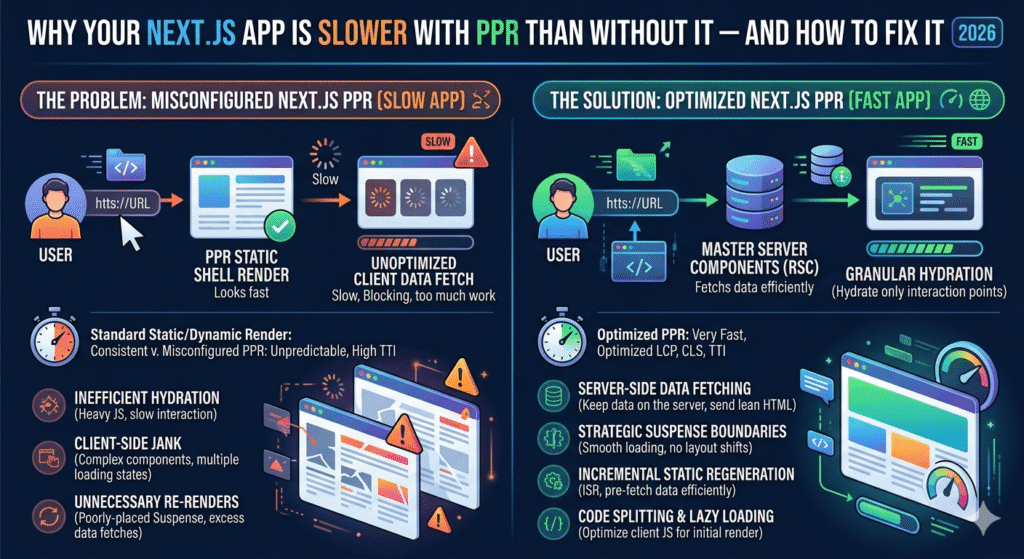
I spent two weeks optimizing our dashboard after enabling Partial Prerendering. Our Lighthouse scores looked beautiful. Our real users? They were seeing worse load times than before.
If you’ve enabled PPR in your Next.js app and noticed your Core Web Vitals tanking, you’re not alone. And no, you didn’t implement it wrong — the problem is that almost every tutorial shows you the happy path without mentioning where PPR falls flat on its face.
What PPR Actually Promised Us
The pitch was simple: get the best of both worlds. Static shell renders instantly, dynamic content streams in afterward. Your users see something immediately instead of staring at a blank screen.
Here’s what the docs showed us:
// app/dashboard/page.jsx
export const experimental_ppr = true;

export default function Dashboard() {
  return (
    <div>
      <StaticHeader />
      <Suspense fallback={<SkeletonStats />}>
        <DynamicStats />
      </Suspense>
    </div>
  );
}
Clean. Simple. Ship it, right?
I did exactly this across our entire app. Wrapped every dynamic component in Suspense, enabled PPR, deployed to production.
Our LCP went from 1.8s to 2.4s. CLS jumped from 0.02 to 0.18. Users started complaining the app felt “janky.”
The Three Ways PPR Quietly Destroys Performance
1. The Skeleton Dimension Death Trap
This one hurt the most because it seemed so obvious in hindsight.
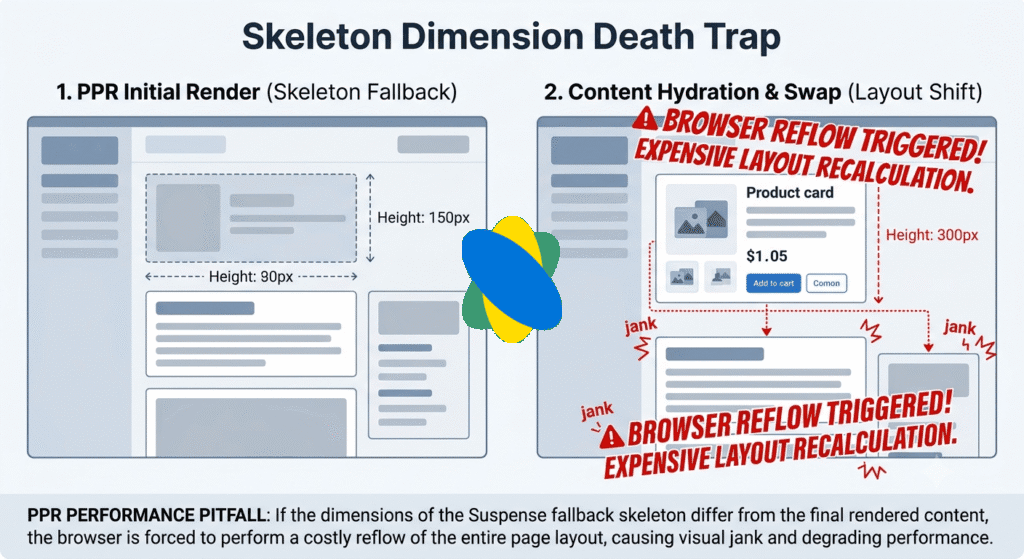
When your Suspense boundary resolves and swaps the fallback for real content, React doesn’t do a full re-render. But if your skeleton and actual content have different heights, the browser has to reflow the entire page.
Here’s what I had:
function SkeletonStats() {
  return (
    <div className="grid grid-cols-3 gap-4">
      <div className="h-24 bg-gray-200 animate-pulse rounded" />
      <div className="h-24 bg-gray-200 animate-pulse rounded" />
      <div className="h-24 bg-gray-200 animate-pulse rounded" />
    </div>
  );
}

function DynamicStats({ data }) {
  return (
    <div className="grid grid-cols-3 gap-4">
      {data.map(stat => (
        <div className="p-6 border rounded"> {/* No fixed height! */}
          <h3 className="text-sm text-gray-600">{stat.label}</h3>
          <p className="text-3xl font-bold">{stat.value}</p>
          <span className="text-xs text-green-600">{stat.change}</span>
        </div>
      ))}
    </div>
  );
}
See the problem? My skeleton was 96px tall (h-24). The actual stat cards? They rendered at 132px because of the padding and text content.
Every time that Suspense boundary resolved, the entire page shifted down by 36 pixels. Multiply that by 4-5 Suspense boundaries on a single page, and you’ve got a CLS nightmare.
The fix wasn’t complicated, just tedious:
function SkeletonStats() {
  return (
    <div className="grid grid-cols-3 gap-4">
      {[1, 2, 3].map(i => (
        <div key={i} className="p-6 border rounded h-[132px]"> {/* Exact height */}
          <div className="h-4 w-20 bg-gray-200 animate-pulse rounded mb-3" />
          <div className="h-9 w-32 bg-gray-200 animate-pulse rounded mb-2" />
          <div className="h-3 w-16 bg-gray-200 animate-pulse rounded" />
        </div>
      ))}
    </div>
  );
}

function DynamicStats({ data }) {
  return (
    <div className="grid grid-cols-3 gap-4">
      {data.map(stat => (
        <div className="p-6 border rounded min-h-[132px]"> {/* Match skeleton */}
          <h3 className="text-sm text-gray-600">{stat.label}</h3>
          <p className="text-3xl font-bold">{stat.value}</p>
          <span className="text-xs text-green-600">{stat.change}</span>
        </div>
      ))}
    </div>
  );
}
My CLS dropped from 0.18 back down to 0.04. Just by making sure the boxes were the same damn size.
2. Suspense Boundary Overload
I got a little too excited with Suspense boundaries. If one was good, ten must be better, right?
Wrong.
// What I did (DON'T do this)
export default function Dashboard() {
  return (
    <div>
      <Suspense fallback={<SkeletonHeader />}>
        <UserHeader />
      </Suspense>
      <Suspense fallback={<SkeletonNav />}>
        <Navigation />
      </Suspense>
      <Suspense fallback={<SkeletonStats />}>
        <StatsCards />
      </Suspense>
      <Suspense fallback={<SkeletonChart />}>
        <RevenueChart />
      </Suspense>
      <Suspense fallback={<SkeletonTable />}>
        <RecentOrders />
      </Suspense>
    </div>
  );
}
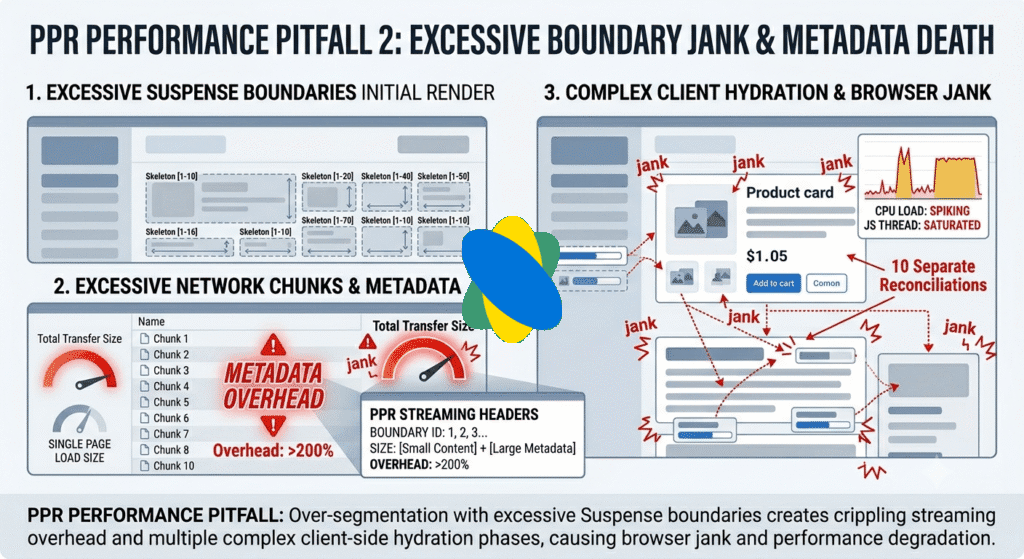
Each Suspense boundary has overhead. The server has to stream each chunk separately. The client has to parse and reconcile each one. The browser has to handle multiple progressive renders.
When I checked the Network tab, I was seeing six separate HTML chunks being streamed in. The total transferred was actually larger than just sending the whole page at once because of all the streaming metadata.
What worked better:
export default function Dashboard() {
  return (
    <div>
      {/* Static parts outside Suspense */}
      <UserHeader />
      <Navigation />

      {/* Group dynamic parts that fetch together */}
      <Suspense fallback={<DashboardSkeleton />}>
        <DashboardContent />
      </Suspense>
    </div>
  );
}

async function DashboardContent() {
  // Fetch in parallel, suspend once
  const [stats, chart, orders] = await Promise.all([
    getStats(),
    getChartData(),
    getRecentOrders(),
  ]);

  return (
    <>
      <StatsCards data={stats} />
      <RevenueChart data={chart} />
      <RecentOrders data={orders} />
    </>
  );
}
One Suspense boundary. One fetch waterfall. One skeleton swap. My TTFB improved by 200ms.
3. Edge Cache Cold Starts Are Real
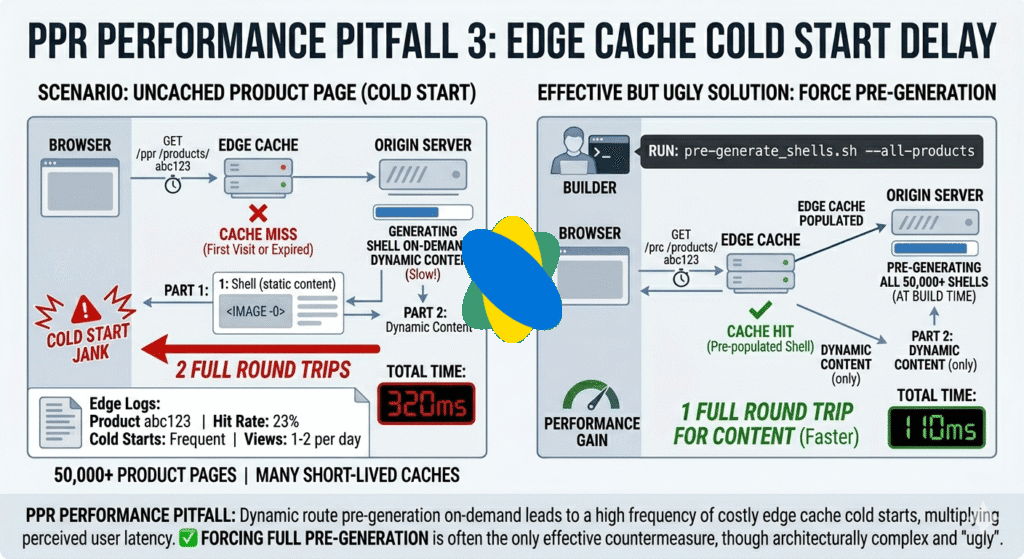
PPR generates static shells at build time. Great. But if you’re using dynamic route params, those shells get generated on-demand and cached at the edge.
Cold starts are brutal.
// app/products/[id]/page.jsx
export const experimental_ppr = true;

export default async function ProductPage({ params }) {
  return (
    <div>
      <ProductHeader productId={params.id} /> {/* Static shell */}
      <Suspense fallback={<SkeletonDetails />}>
        <ProductDetails productId={params.id} />
      </Suspense>
    </div>
  );
}
First user to hit /products/abc123? They wait for the shell to generate, then wait for the dynamic content. That’s two round trips instead of one.
I checked our edge logs. We have 50,000+ product pages. Cache hit rate was 23%. Most product pages got 1-2 views per day, so the cache was constantly expiring.
For pages like this, PPR made things objectively worse. The solution was ugly but effective:
// next.config.js
module.exports = {
  experimental: {
    ppr: 'incremental',
  },
}

// app/products/[id]/page.jsx
export const experimental_ppr = false; // Disable for this route

// app/dashboard/page.jsx
export const experimental_ppr = true; // Enable for high-traffic routes
Selective PPR. Only use it where the cache hit rate justifies the complexity.
How to Actually Audit PPR (Not With Lighthouse)
Lighthouse runs in a perfect lab environment. It doesn’t show you the skeleton→content layout shifts. It doesn’t show you edge cache misses. It doesn’t show you streaming overhead on slow connections.
Here’s what I actually used:
Real User Monitoring
// app/layout.jsx
'use client';

import { useReportWebVitals } from 'next/web-vitals';

export function WebVitals() {
  useReportWebVitals((metric) => {
    // Send to your analytics
    fetch('/api/vitals', {
      method: 'POST',
      body: JSON.stringify({
        name: metric.name,
        value: metric.value,
        id: metric.id,
        label: metric.label,
      }),
      keepalive: true,
    });
  });
}
Watch CLS especially. If it’s higher with PPR enabled, your skeletons don’t match.
Network Throttling Tests
I used Chrome DevTools to throttle to “Fast 3G” and recorded the experience:
# Without PPR: Single HTML response, 1.2s to interactive
# With PPR: Static shell at 400ms, content streams in until 1.8s
Server-Timing Headers
// middleware.js
export function middleware(request) {
  const start = Date.now();
  const response = NextResponse.next();
  const duration = Date.now() - start;

  response.headers.set('Server-Timing', `shell;dur=${duration}`);
  return response;
}
Check the Server-Timing headers in production. If shell generation takes >100ms, PPR isn’t helping.
When to Just Turn PPR Off
Sometimes the honest answer is: PPR isn’t worth it for your route.
Turn it off when:
- Low traffic routes — If your cache hit rate is below 40%, the cold start overhead isn’t worth it.
- Fast dynamic content — If your dynamic content loads in under 200ms anyway, the static shell doesn’t buy you much.
- Content-heavy pages — Blog posts, documentation, anything where the “dynamic” part is actually the main content. Users would rather wait 100ms more and see the real content than see a skeleton.
- Mobile-first apps — Streaming on slow mobile connections can feel worse than a single fast load.
Here’s how to disable it surgically:
// app/blog/[slug]/page.jsx
export const experimental_ppr = false;

// app/dashboard/page.jsx
export const experimental_ppr = true;
What Actually Worked for Us
After two weeks of debugging, here’s what our dashboard looks like now:
export const experimental_ppr = true;

export default function Dashboard() {
  return (
    <div className="min-h-screen">
      {/* Static shell - renders immediately */}
      <DashboardHeader />
      <DashboardNav />

      {/* Single suspense boundary for all dynamic content */}
      <Suspense fallback={<DashboardSkeleton />}>
        <DashboardContent />
      </Suspense>
    </div>
  );
}

async function DashboardContent() {
  // All fetches happen in parallel
  const [user, stats, activity] = await Promise.all([
    getCurrentUser(),
    getUserStats(),
    getRecentActivity(),
  ]);

  return (
    <div className="p-6 space-y-6">
      <UserGreeting user={user} />
      <StatsGrid stats={stats} />
      <ActivityFeed activity={activity} />
    </div>
  );
}

function DashboardSkeleton() {
  return (
    <div className="p-6 space-y-6">
      {/* Exact same spacing and dimensions */}
      <div className="h-12 w-64 bg-gray-200 animate-pulse rounded" />
      <div className="grid grid-cols-4 gap-4">
        {[1, 2, 3, 4].map(i => (
          <div key={i} className="h-32 bg-gray-200 animate-pulse rounded" />
        ))}
      </div>
      <div className="h-96 bg-gray-200 animate-pulse rounded" />
    </div>
  );
}
Results after the fixes:
- LCP: 2.4s → 1.6s (better than before PPR)
- CLS: 0.18 → 0.03
- User complaints: 0
PPR is powerful, but it’s not automatic performance. You have to measure, match your skeleton dimensions, and be willing to turn it off when it doesn’t help.
The best feature is the one that makes your users’ experience better, not the one that makes your Lighthouse score look good.
Frequently Asked Questions
Does PPR work with the App Router only, or can I use it with Pages Router?
PPR is App Router exclusive. If you’re still on Pages Router, you need to migrate first—but don’t migrate just for PPR.
I’ve seen teams migrate, enable PPR everywhere, and end up slower than before. Start selective: enable it on one high-traffic route, measure real user metrics for a week, then expand. I use it on our dashboard (10k+ daily users, 80%+ cache hits) but disabled it on product pages (long-tail traffic, 30% cache hits). Selective beats all-or-nothing.
My Lighthouse score improved with PPR but real users are complaining. What’s happening?
Lighthouse tests in a perfect lab. It doesn’t catch skeleton layout shifts, slow 3G streaming jank, or edge cache cold starts that hit real users.
Skip Lighthouse. Use Real User Monitoring instead—either Next.js’s useReportWebVitals or services like SpeedCurve. Compare one week before PPR vs. after. If p75 CLS jumps more than 0.05, your skeletons don’t match. If p75 LCP increases, PPR isn’t helping your use case.
I’ve seen apps with 95+ Lighthouse scores and terrible real-world Web Vitals. Trust your users, not your CI pipeline.
Most Popular Article
Next.js Server Components Making Your App Slow?
Next.js Partial Prerendering Documentation
Next.js App Router Documentation